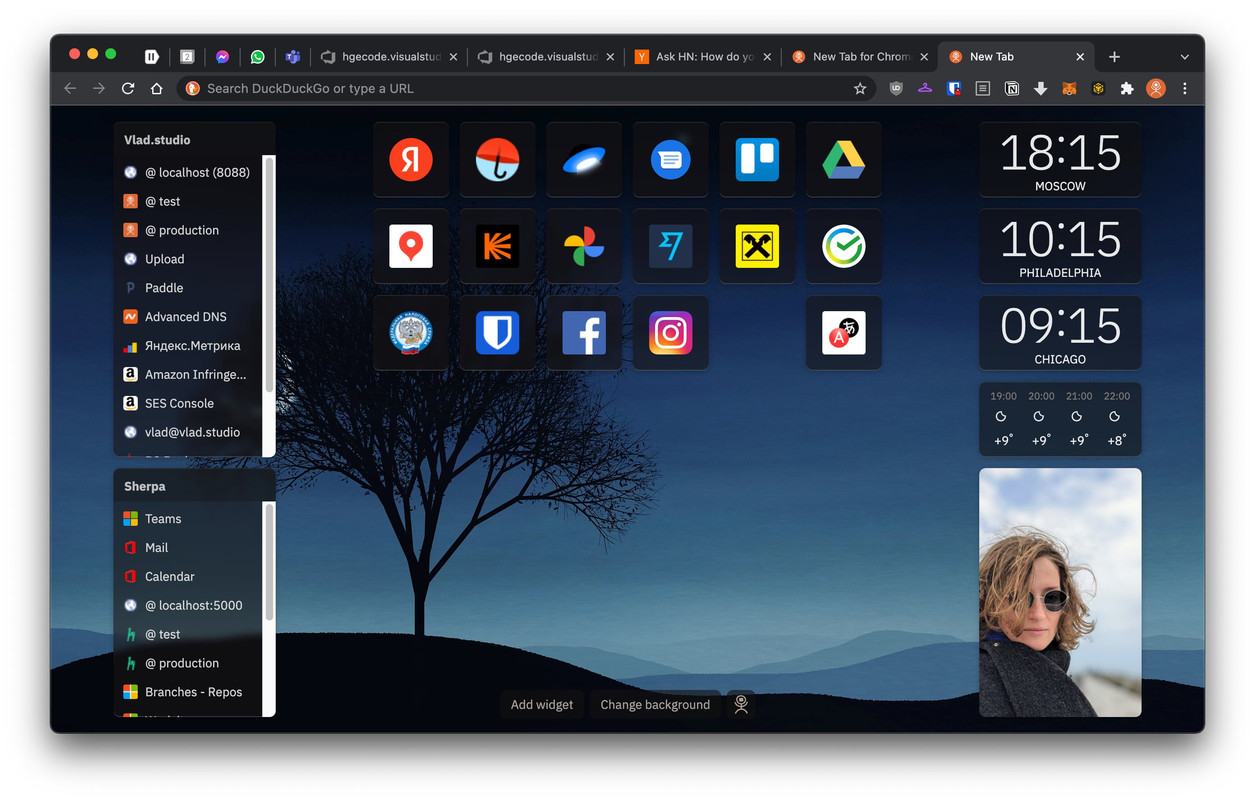
I'm considering building something with Next.js or Gatsby that I can self-host, but I'd love suggestions of the most customizable tools that would allow me to quickly integrate data "widgets" from diverse sources like Nextcloud, Fastmail, RSS readers (Inoreader, maybe), CalDAV, bank accounts, etc.
The goal for any portal site was to convince you to spend more time on the portal (this is how we got {Yahoo,Google} news). The more time on the portal was more ad impressions they could sell. Social media didn’t like sharing content this way and so portals became significantly less popular.
I’d forgotten how much I’d missed those.
But in case you weren't aware, there is a subreddit for startpages (because, of course there is), you might find some inspiration and ideas there:
The main/first page of a website was the "frontpage" to its visitors (but it surely felt like a home page to the owner - and it may have been).
In any web event, I think you will be best served by plain old html. It will be faster (in nearly all ways) than next.js or Gatsby.
It runs in a docker container, has support out of the box for custom bookmarks and links and also detects other docker containers running on your machine and automatically lists them on the dashboard. It is even opensource, so you can customise it to your liking [2].
What I really like about my personal start page is it's RSS feed. I found this article through that :). Other features are of course the bookmarks and light/dark theme.
Don't forget to use new tab redirect (my favorite) https://chrome.google.com/webstore/detail/new-tab-redirect/i... it highlights the URL bar so when you're not interested in clicking a bookmark you can do a search query right away.
It does not include widget support though, so it doesn't address all of the issues mentioned in the original post.
- uses plain text files as storage
- embedded option to run shell scripts while rendering. Eg `!date +%D` would execute date and insert contents.
The part of using text files was that I can leverage unix tools. This allowed me to grep for todos, follow up things. Keep a format that works for me.
To your question about widgets, it mainly renders Markdown dolls so adding HTML should be simple.
Anyway, if anyone’s breve enough to try it out, I’d be interested in your feedback! Always wanted to make this a tool for teams to share their common bookmarks and links with one another.
I have a chrome and Firefox extension too to ensure the new tab page is set to homepagr. It also has screenshots of what it looks like after logging in.
[0] https://addons.mozilla.org/en-US/firefox/addon/humble-new-ta...
I wouldn't do it like that now, but the ability to quickly make wiki style edits is very useful. Plus having data stored locally before you need it is very convenient, and comes in handy during the occasional outage.
I use the 'New Tab Redirect' extension to set a local web page for new tabs in Chromium.
https://chrome.google.com/webstore/detail/earth-view-from-go...
I had one[2] that I had also made with lots of nice widgets like you are suggesting, but I realized that I wasn't using 90% of them, and so I reverted to something simpler.
For me, the simplest thing with the smallest amount of failure points is key.
Out of all the things I created I still get the most positive feedback on a single html file I mostly created for myself.
I set up a "Frequent" tab group at the top, which has the pages that I often go to but that have weird URLs that I always struggle a little to find the right URL.
I really started using it for cross-machine tab parking. I always end up with a ton of tabs open across 2 chromebooks and my work machine, and "OneTab" helps, but has no ability to manage across multiple machines or browsers. With Toby I created sections for "Tooling Research", "General Work Research", "Logging and Monitoring", and individual projects that I seem to always want to get back to by leaving tabs open.
The down side is it takes a good 2 seconds when I hit "new tab" for it to load. I have been quite happy with it though.
There are Python scripts that fill the content of the page and generate the markup for me. Those Python scripts go out and grab the price of various crypto currencies in my portfolio, several comic strips, the front page of hackernews, some cute cat pictures from reddit, my bank balance, the subjects in my email inbox, discord messages for work, the messages from my linkedin account, weather for the next three days, upcoming bills to pay, and a few other bits and pieces, along with several links to sites I regularly visit.
I thought about a Google search box but then I use Alfred/Albert/Wox, or can simply hit CTRL+L when the browser is open.
I have set up and taken off many ideas over the years, e.g. a link to open up OneNote and create a new entry, but then I just press WIN/CMD/SUP+N, or links to websites I only occasionally visit. What I have generally avoided is just having links to sites, e.g. github, LinkedIn, without those links being something that provided useful information.
Everything is stored in plain text files. I have a few .ini files that need a little more structure.
Some scripts run every few minutes (update email inbox), but most scripts run every 12 hours (crypto currency prices, comic strips, etc). My homepage Python scripts sit on my main server, and have been plodding along quietly for over 25 years, with occasional updates as I've added new features, e.g. linkedin, or changed email providers.
With separate, external scripts that output blocks of HTML, if one of the scripts breaks for whatever reason, e.g. a webiste updated or the API keys expired, nothing breaks on my homepage. It just keeps trucking. If a script breaks, it simply generates an empty HTML block.
There is nothing interactive or dynamic on the page, which means it is viewable and usable and on almost every device out there.
Since I don't have mine in a public repo, a cursory search shows a good example here. The manifest.json bit here is the only thing needed iirc.
https://github.com/kaissaroj/chrome-newtab/blob/master/manif...
I’m now running weather and calendar widgets on my ipad home screen and some pinned favourites in Safari and that’s it.
I'd lean strongly toward something written using Markdown and converted to HTML, though depending on the specific configuration I wanted, straight raw HTML could very well end up being the format.
This is a case where content is vastly more significant than presentation or tools used, and simpler is better.
Some might also use tools such as Emacs org-mode, Joey Hess's Ikiwiki (https://ikiwiki.info/), VimWiki, or the like for a more structured set of pages rather than a single page.
For example: https://random.vodka-pomme.net/
[1] https://chrome.google.com/webstore/detail/nighttab/hdpcadigj...
It's built with a simple single file PHP that loads a list of links and formats them into collections of topic cards. The edit button lets me update the links file where-ever I am.
It's held centrally on a spare domain, and is set as the home and new tab page on all my machines.
Super simple, ultra-low maintenance, gets me 80% there.
Firefox pinned pages just show the favicon so you can have a ton of them in one window. And they're not pinned in other windows so you can have one just for the pinned ones.
I don't use any frameworks since it's a pretty simple page, essentially just groups of links. If you need to, you can always use something like fetch to load external resources.
TBH i would avoid self hosting, as in my experience whatever middle point you will leverage for your feeds will end up being deprecated/sun-setted or whatever
Don’t overthink or overdesign something that you will need to use from any browser on any device (my concession to design is using some Material icons, but even then I’m not keen on having the page fail to load because my Internet connection is down).
I used to hand craft an HTML page full of links that I used daily. Something that looked like a prettier Craigslist, and was static, fully enclosed CSS, inline with the HTML.
Then, I realized that I wanted to store more information than just links. But I didn't want to deal with all the JS crap or content management systems. I knew about mdBook from my dabbling in Rust, and decided to try it out.
Now I have a nice "book" instead of a home page, and it's multi-page, static, fast, portable, and easy to use.
The only drawback is that I can't use it on an iPad or iPhone, so if someone has suggestions on that, I'd love to hear them.
Now I just use the default browser start page, and periodically tweak my bookmarks bar. I make sure to turn off news articles / links, because I often get distracted by them when I'm trying to work.
Amazingly, it still exists and appears to be up-to-date.
I have two or three specific sites always open in Firefox and a half-dozen or so in Vivaldi.
It is just static HTML with some links + some style to make it look nice.
I add to the start page (which has devolved into a favorite links page) through a bookmarklet
That’s the only home page I want to have set on any browser I use.
Make a "Personal Start Worksheet" instead.
I use multiple profiles in FF and my start page is the profile selector.