HACKER Q&A
📣 yosito

How do you build your personal start page?


By personal start page, I mean a custom-made web page that you would set as the home page in your browser and use it as the starting point of doing things in the browser.

I'm considering building something with Next.js or Gatsby that I can self-host, but I'd love suggestions of the most customizable tools that would allow me to quickly integrate data "widgets" from diverse sources like Nextcloud, Fastmail, RSS readers (Inoreader, maybe), CalDAV, bank accounts, etc.


  👤 mbreese Accepted Answer ✓
This sounds an awful lot like a portal that was so popular around 2000. That’s the way it used to be. You’d setup a personal portal on Yahoo or MSN or iGoogle or whomever provided your email. Then you’d load up whatever widgets you wanted and placed them in an organized grid. News and fresh content was populated by RSS and you’d have you own personal start page on the Internet.

The goal for any portal site was to convince you to spend more time on the portal (this is how we got {Yahoo,Google} news). The more time on the portal was more ad impressions they could sell. Social media didn’t like sharing content this way and so portals became significantly less popular.

I’d forgotten how much I’d missed those.


👤 pacificmint
It's been years since I had one, and when I did it was plain, static html only. So I don't have any personal recommendations.

But in case you weren't aware, there is a subreddit for startpages (because, of course there is), you might find some inspiration and ideas there:

https://old.reddit.com/r/startpages/


👤 acklenx
It's called a "home page". You even say that yourself. It's why the browser has a "home" button ... To take you to your (personal) home page. And even before that button and [saved] bookmarks, you had to have some place that contained your personal bookmarks. It was the page you set your browser to load when you opened it. And you did absolutely make it yourself (it was the first webpage I ever made).

The main/first page of a website was the "frontpage" to its visitors (but it surely felt like a home page to the owner - and it may have been).

In any web event, I think you will be best served by plain old html. It will be faster (in nearly all ways) than next.js or Gatsby.


👤 rohithkp
I use the Flame Dashboard [1].

It runs in a docker container, has support out of the box for custom bookmarks and links and also detects other docker containers running on your machine and automatically lists them on the dashboard. It is even opensource, so you can customise it to your liking [2].

[1] https://hub.docker.com/r/pawelmalak/flame

[2] https://github.com/pawelmalak/flame


👤 vladstudio
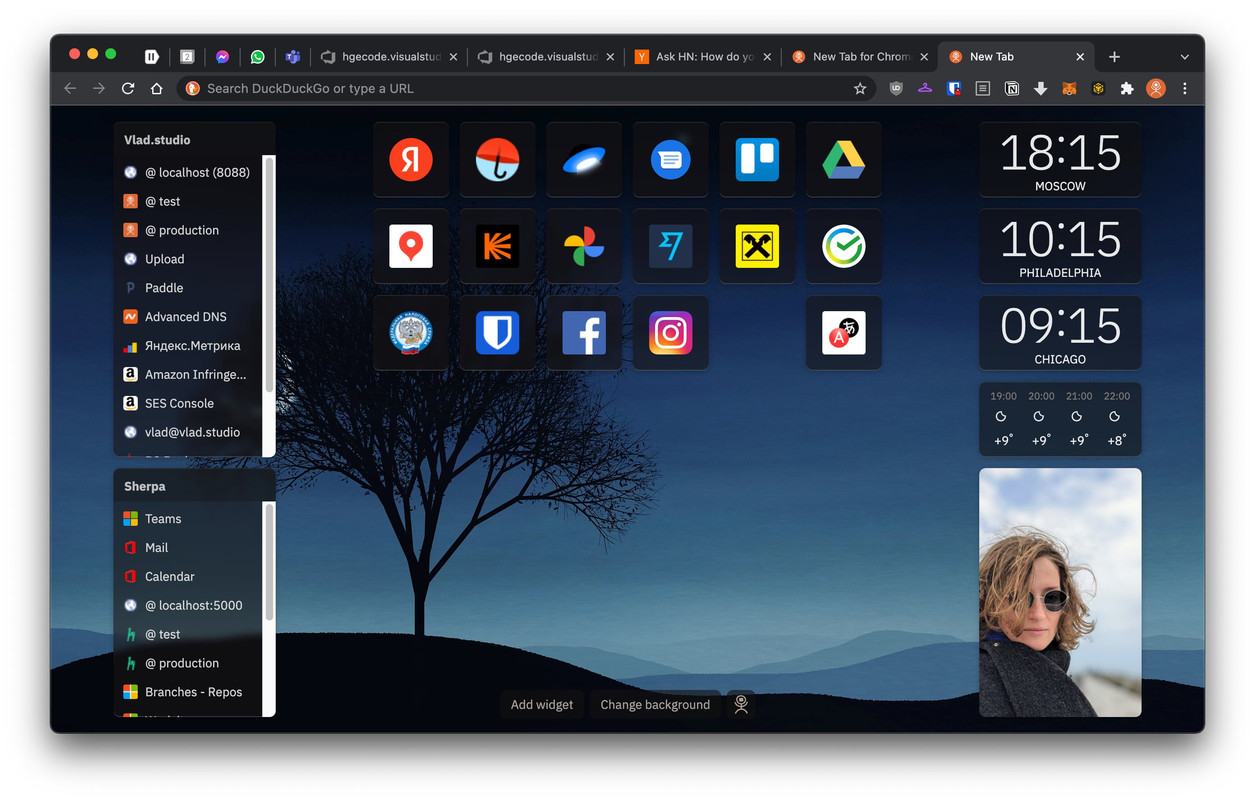
Oh please please may I shamelessly link to the Vlad.studio new tab extension [0] - I built it to solve this exact problem for myself, but also as another way for my wallpapers to be seen. This is how my new tab page looks now: [1]

[0] https://new-tab.vlad.studio/

[1] https://i.postimg.cc/y8R3x0Yt/my-new-tab.jpg


👤 jstx1
Empty new tab in Firefox works great. There are also blank new tab extensions if you use Chrome.

👤 quintenps
I've built a start page a while ago, if you're interested you can change the config and use it yourself. https://github.com/Quintenps/Startpagev2

What I really like about my personal start page is it's RSS feed. I found this article through that :). Other features are of course the bookmarks and light/dark theme.

Don't forget to use new tab redirect (my favorite) https://chrome.google.com/webstore/detail/new-tab-redirect/i... it highlights the URL bar so when you're not interested in clicking a bookmark you can do a search query right away.


👤 visiblink
Just to contribute to the general discussion, I use Bookmarks Home add-on for firefox (https://addons.mozilla.org/en-US/firefox/addon/bookmarkshome...). It turns your bookmarks into a homepage. You can customize which bookmarks folders appear and tweak the css. You can also save the page to html and turn off or remove the add-on if you like.

It does not include widget support though, so it doesn't address all of the issues mentioned in the original post.


👤 satran
I have a custom built system: https://github.com/satran/edi It does two things I have longed in other systems:

- uses plain text files as storage

- embedded option to run shell scripts while rendering. Eg `!date +%D` would execute date and insert contents.

The part of using text files was that I can leverage unix tools. This allowed me to grep for todos, follow up things. Keep a format that works for me.

To your question about widgets, it mainly renders Markdown dolls so adding HTML should be simple.


👤 memset
I built one! I’ve tried to monetize it but I’ve given up on that. This is why there is literally nothing on the home page except a login link, which you’re free to try out.

https://www.homepagr.com/

Anyway, if anyone’s breve enough to try it out, I’d be interested in your feedback! Always wanted to make this a tool for teams to share their common bookmarks and links with one another.

I have a chrome and Firefox extension too to ensure the new tab page is set to homepagr. It also has screenshots of what it looks like after logging in.

https://addons.mozilla.org/en-US/firefox/addon/homepagr/


👤 fractal618
New tab page or more recently I've set my start page to a procedurally generated weather forecast image file hosted at weather.gov it works really well and it loads instantly which is critical for any start page in my opinion

👤 ajot
I used speeddials for some years, then some other obscure addons and local html files. A few years ago, via G-Hacks, I found Humble New Tab Page[0], and it's been love at first sight. It has some little quirks if you are clumsy as I am and move a folder to another column, but it's not that hard to undo by hand. As a plus, it was a good excuse to bookmark frequent pages and put them inside folders.

[0] https://addons.mozilla.org/en-US/firefox/addon/humble-new-ta...


👤 dec0dedab0de
That's actually where I first used my username. It was dec0dedab0de.local And the server had the same mac address, which I thought was fun. It's been over a decade now, but I used a locally hosted media wiki instance, and had some bash/python scripts running on a cron to scrape various sources and update the wiki.

I wouldn't do it like that now, but the ability to quickly make wiki style edits is very useful. Plus having data stored locally before you need it is very convenient, and comes in handy during the occasional outage.


👤 elaus
I use a small Ruby script that fetches some RSS feeds and creates a static HTML page with that content. The script gets executed via cronjob and is hosted locally on my machine, served via python's integrated web server. That way I have basically no loading time when opening a new tab and I'm independant from 3rd party services that close down or change in unwanted ways.

I use the 'New Tab Redirect' extension to set a local web page for new tabs in Chromium.


👤 simonsarris
The last thing I want to see are widgets, data feeds, "suggestions", etc. Instead, I use Google Earth's chrome extension called Earth View that just shows a pretty picture of the earth, somewhere.

https://chrome.google.com/webstore/detail/earth-view-from-go...


👤 duiker101
I made my own[1] as a Chrome extension.

I had one[2] that I had also made with lots of nice widgets like you are suggesting, but I realized that I wasn't using 90% of them, and so I reverted to something simpler.

[1] https://github.com/duiker101/takeoff

[2] https://i.imgur.com/qwIxg6a.png


👤 jordanmorgan10
I built swiftjectivec.com using Jekyll and Netlify. I’m in the iOS world by trade, and over the last decade web technology and the flavor of the week has changed faster than I care to keep up with. So this simple, dare I say “dumb” setup, is perfect for me. I also use the same approach for stuff I sell too, such as bestinclassiosapp.com

For me, the simplest thing with the smallest amount of failure points is key.


👤 captainmisery
At my job I made a "startpage" on our shared drive. Just an index.html that most of the company now uses. It contains links to all our internal tools en company sites. Layout is a simple css card grid. Its grouped per department so a specificatie link is easy to find.

Out of all the things I created I still get the most positive feedback on a single html file I mostly created for myself.


👤 linsomniac
A few weeks ago I did some research and started using the Toby tab manager plugin for Firefox and Chrome: https://www.gettoby.com/

I set up a "Frequent" tab group at the top, which has the pages that I often go to but that have weird URLs that I always struggle a little to find the right URL.

I really started using it for cross-machine tab parking. I always end up with a ton of tabs open across 2 chromebooks and my work machine, and "OneTab" helps, but has no ability to manage across multiple machines or browsers. With Toby I created sections for "Tooling Research", "General Work Research", "Logging and Monitoring", and individual projects that I seem to always want to get back to by leaving tabs open.

The down side is it takes a good 2 seconds when I hit "new tab" for it to load. I have been quite happy with it though.


👤 justinlloyd
I have a completely static, light-weight homepage, with some clean CSS styling to provide me with my stepping off point.

There are Python scripts that fill the content of the page and generate the markup for me. Those Python scripts go out and grab the price of various crypto currencies in my portfolio, several comic strips, the front page of hackernews, some cute cat pictures from reddit, my bank balance, the subjects in my email inbox, discord messages for work, the messages from my linkedin account, weather for the next three days, upcoming bills to pay, and a few other bits and pieces, along with several links to sites I regularly visit.

I thought about a Google search box but then I use Alfred/Albert/Wox, or can simply hit CTRL+L when the browser is open.

I have set up and taken off many ideas over the years, e.g. a link to open up OneNote and create a new entry, but then I just press WIN/CMD/SUP+N, or links to websites I only occasionally visit. What I have generally avoided is just having links to sites, e.g. github, LinkedIn, without those links being something that provided useful information.

Everything is stored in plain text files. I have a few .ini files that need a little more structure.

Some scripts run every few minutes (update email inbox), but most scripts run every 12 hours (crypto currency prices, comic strips, etc). My homepage Python scripts sit on my main server, and have been plodding along quietly for over 25 years, with occasional updates as I've added new features, e.g. linkedin, or changed email providers.

With separate, external scripts that output blocks of HTML, if one of the scripts breaks for whatever reason, e.g. a webiste updated or the API keys expired, nothing breaks on my homepage. It just keeps trucking. If a script breaks, it simply generates an empty HTML block.

There is nothing interactive or dynamic on the page, which means it is viewable and usable and on almost every device out there.


👤 conceptualspace
You can check out mine, Yet Another Speed Dial, on GitHub! It's a web extension in vanilla JS:

https://github.com/conceptualspace/yet-another-speed-dial


👤 herhor
Perfect Home for all my browsers (https://github.com/perfect-things/perfect-home). Just displays your browser bookmarks in a nice way.

👤 ghotli
You don't need anything fancy. Start with any sample "New Tab" extension for chrome and firefox found on github, strip it back to being basically blank then add whatever you want. Enjoy! I really like my custom new tab extension and have tinkered with it for years

Since I don't have mine in a public repo, a cursory search shows a good example here. The manifest.json bit here is the only thing needed iirc.

https://github.com/kaissaroj/chrome-newtab/blob/master/manif...


👤 hvgk
Before you do this, consider my discovery after running one for 2 years: all the integrations break, all the time.

I’m now running weather and calendar widgets on my ipad home screen and some pinned favourites in Safari and that’s it.


👤 rognjen
I have a couple of folders in the bookmarks bar and I just Ctrl+Click them. There's always one for each project I'm working on, there's one for some admin stuff, and a side project or two.

👤 dredmorbius
Flat text.

I'd lean strongly toward something written using Markdown and converted to HTML, though depending on the specific configuration I wanted, straight raw HTML could very well end up being the format.

This is a case where content is vastly more significant than presentation or tools used, and simpler is better.

Some might also use tools such as Emacs org-mode, Joey Hess's Ikiwiki (https://ikiwiki.info/), VimWiki, or the like for a more structured set of pages rather than a single page.


👤 shakow
I have my own system (https://domovik.app/, https://github.com/domovikapp/), which displays shared reading lists and remote tabs/bookmarks from all my browsers. It does not integrate other data sources, but I can quickly access those with the bookmark bar.

👤 knz42
Have you thought about simple iframes?

For example: https://random.vodka-pomme.net/


👤 arvigeus
I use nightTab for that. It allows me to have collapsible categories, set custom color for each item, etc. Additionally I can export/import existing configurations.

[1] https://chrome.google.com/webstore/detail/nighttab/hdpcadigj...


👤 mattowen_uk
This is my personal Start Page:

https://imgur.com/a/RKHB5LX

It's built with a simple single file PHP that loads a list of links and formats them into collections of topic cards. The edit button lets me update the links file where-ever I am.

It's held centrally on a spare domain, and is set as the home and new tab page on all my machines.


👤 cseleborg
I don't really have a start page, but I do use bookmark folders quite a bit for a similar purpose. For example, I have all my analytics links (Google Search Console, my own Matomo, Google Trends etc.) in one such folder, and when I need my data, I middle-click it (yeah, I'm a mouse guy), which opens all the pages in different tabs.

Super simple, ultra-low maintenance, gets me 80% there.


👤 JohnDeHope
My subscription to http://start.me has been worth every penny I pay for it.

👤 GekkePrutser
I don't anymore. I just keep my favourite pages pinned in a window that's always open in one of my virtual desktops so I can easily jump to them. It's easier and more readily available.

Firefox pinned pages just show the favicon so you can have a ton of them in one window. And they're not pinned in other windows so you can have one just for the pinned ones.


👤 Farow
I personally aim for a startpage that loads instantly and since browsers no longer let you use a local html file as one, I've made an extension that registers a custom new tab page.

I don't use any frameworks since it's a pretty simple page, essentially just groups of links. If you need to, you can always use something like fetch to load external resources.


👤 mouzogu
I used to have a flat static html file where I pulled in various RSS feeds using Google's old RSS Javascript API. Yahoo also had a neat library called pipes that allowed you to do something similar.

TBH i would avoid self hosting, as in my experience whatever middle point you will leverage for your feeds will end up being deprecated/sun-setted or whatever


👤 rcarmo
I just built a static page with minimal JavaScript to put up a list of links to my tools (Gitea, Jupyter, etc.).

Don’t overthink or overdesign something that you will need to use from any browser on any device (my concession to design is using some Material icons, but even then I’m not keen on having the page fail to load because my Internet connection is down).


👤 daralthus
I forked https://github.com/antonycourtney/tabli to show the same UI on new tabs as well. It's a good enough solution to tab overload and helps me organize and re-open the appropriate contexts to work or research.

👤 databased

👤 cs0
I built mine to learn Angular, then ported it over to React. I had some help building some customization options like color/background selection, and have it set up so you can log in to GitHub and backup/restore your bookmarks to a Gist.

https://ngstartpage.uk


👤 MR4D
mdBook.[0]

I used to hand craft an HTML page full of links that I used daily. Something that looked like a prettier Craigslist, and was static, fully enclosed CSS, inline with the HTML.

Then, I realized that I wanted to store more information than just links. But I didn't want to deal with all the JS crap or content management systems. I knew about mdBook from my dabbling in Rust, and decided to try it out.

Now I have a nice "book" instead of a home page, and it's multi-page, static, fast, portable, and easy to use.

The only drawback is that I can't use it on an iPad or iPhone, so if someone has suggestions on that, I'd love to hear them.

[0] - https://rust-lang.github.io/mdBook/


👤 gwbas1c
Years ago I wrote one as a side project, which I hosted on a desktop computer.

Now I just use the default browser start page, and periodically tweak my bookmarks bar. I make sure to turn off news articles / links, because I often get distracted by them when I'm trying to work.


👤 ataybchiba

👤 codingdave
I just use bookmarks, and open my 'Daily' folder each morning which, as the name implies, opens up the sites I read each day. If you want something fancier, more power to you, but I don't have a problem with simple bookmarking.

👤 slipwalker
for years now my "personal home page" has been a TiddlyWiki[0] collection of notes and bookmarks. Simple, lightweight and very useful.

0: https://tiddlywiki.com/


👤 lukedjn
I used to live in Netvibes.com, looks like it still exists and has a free tier.

👤 Arubis
I point my new tabs to Paperback (https://readpaperback.com/), which rolls up anything I’ve marked To Read in Pinboard.io and presents it nicely.

👤 jccalhoun
Mine is just html, css, and javascript. I have a couple widgets which use iframes. hosted on github. https://jccalhoun.github.io/

👤 BruceEel
Haven't had one for a (long) while but centuries ago I used to set it to:

https://dailyrotation.com/

Amazingly, it still exists and appears to be up-to-date.


👤 Archelaos
In Firefox I am using the "New Tab Override" add-on together with a static local HTML file that I edit "manually" in a text editor with just HTML syntax highlighting.

👤 dusted
Last time I had a personal start page was during the windows 2000 days, it consisted of a few HTML files in my Documents directory, it was plain HTML and just linked to stuff.

👤 thanatos519
Here is mine in its entirety:

~


👤 Terry_Roll

👤 nobody9999
I just have my browser open the tabs I had open when I last closed the browser.

I have two or three specific sites always open in Firefox and a half-dozen or so in Vivaldi.


👤 RedNifre
I have raw html in one file, which contains a list of named links and a bit CSS from one of those "This is a motherfriendly website" variants.


👤 juangacovas
I like the simple system of DokuWiki, no databases.

👤 nstart
Never thought of this until I read this thread and now this is going to be my next fun hobby project for myself. Thank you!

👤 polonbike
I use the free tier of netvibes I made a page containing bookmarks, emails, notes, a few RSS, my own perfect start page.

👤 melenaos
Create a Notion account. There you can create a password protected homepage with all the power and features of Notion.

👤 marban
https://yup.is (Business News & Search)

👤 0xdeadb00f
I don't even use my custom startpage anymore.

It is just static HTML with some links + some style to make it look nice.


👤 gman83
I use the Custom New Tab URL extension that's set to my Notion page where I organize my projects.

👤 penjelly
notion with links to various todolists, calendars & note taking areas & new tab redirect

👤 yawnxyz
mine's built in Svelte/Sapper with Airtable as the CMS. Sometimes I just use Airtable directly, but Svelte gives me a better interface. Hosted as serverless app on Vercel.

I add to the start page (which has devolved into a favorite links page) through a bookmarklet


👤 drran
I use simple TODO manager in local HTML file with local storage for data as the start page.

👤 tutuncommon
I used momentum for a while. Not that flexible though. Maybe worth a look.

👤 mynameismon
Personally, I use Vivaldi, which has a simple (but opionated) start page

👤 chanandler_bong
I use Caret Tab. Nicely configurable, syncs with browser settings.

👤 klysm
I don’t, I type into the search bar and let my history do the work

👤 bradknowles
About:blank

That’s the only home page I want to have set on any browser I use.


👤 dolmen
I just restore the last session to reopen all my tabs.

👤 TeeWEE
I dont, it's just distraction. I have bookmarks

👤 BrianOnHN
Don't.

Make a "Personal Start Worksheet" instead.


👤 igetspam
about:profiles

I use multiple profiles in FF and my start page is the profile selector.

👤 kgwxd
about:blank

👤 tolstoywasright
Wordpress?

👤 rodmena
Sapper

👤 luke2m
about:blank