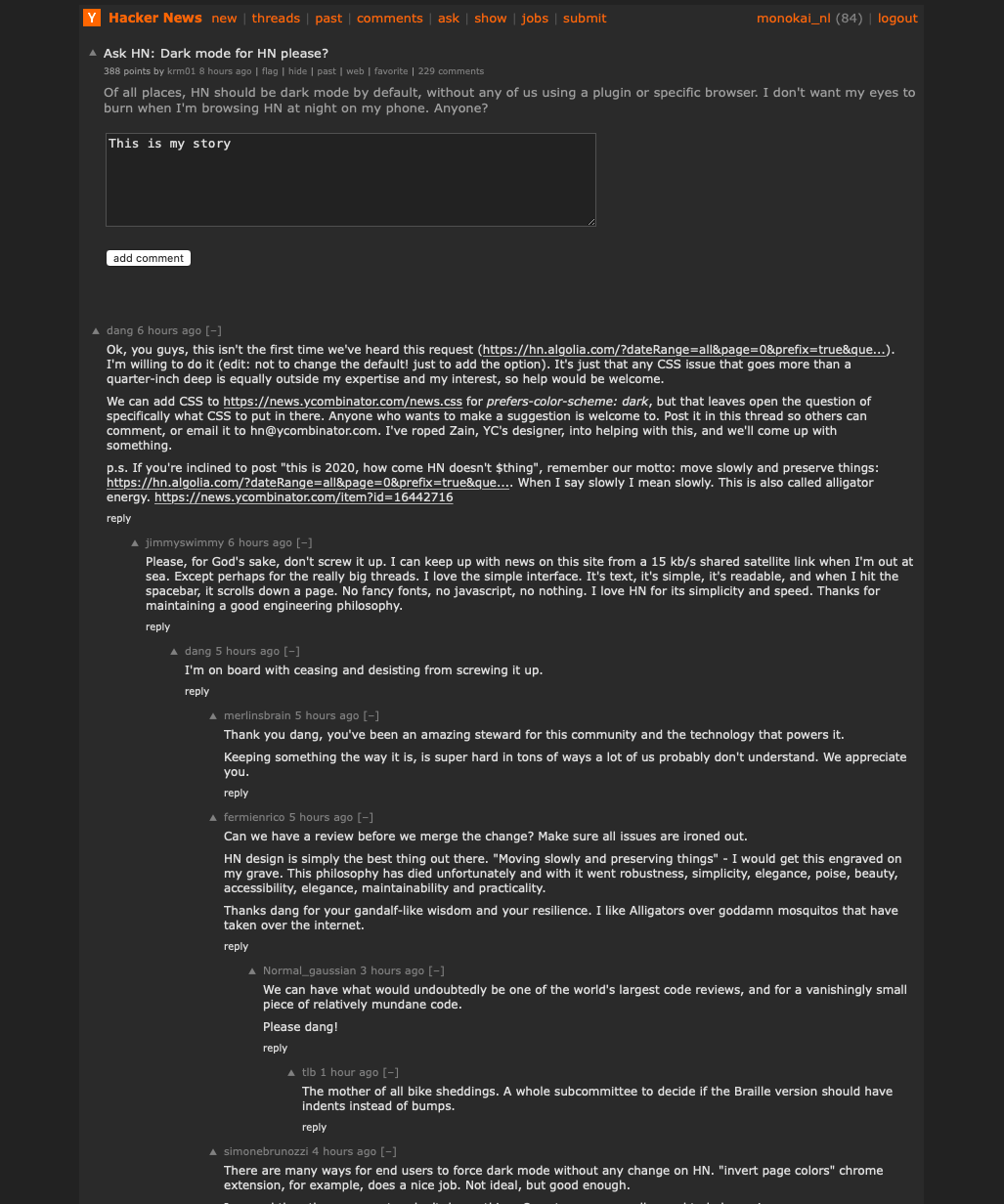
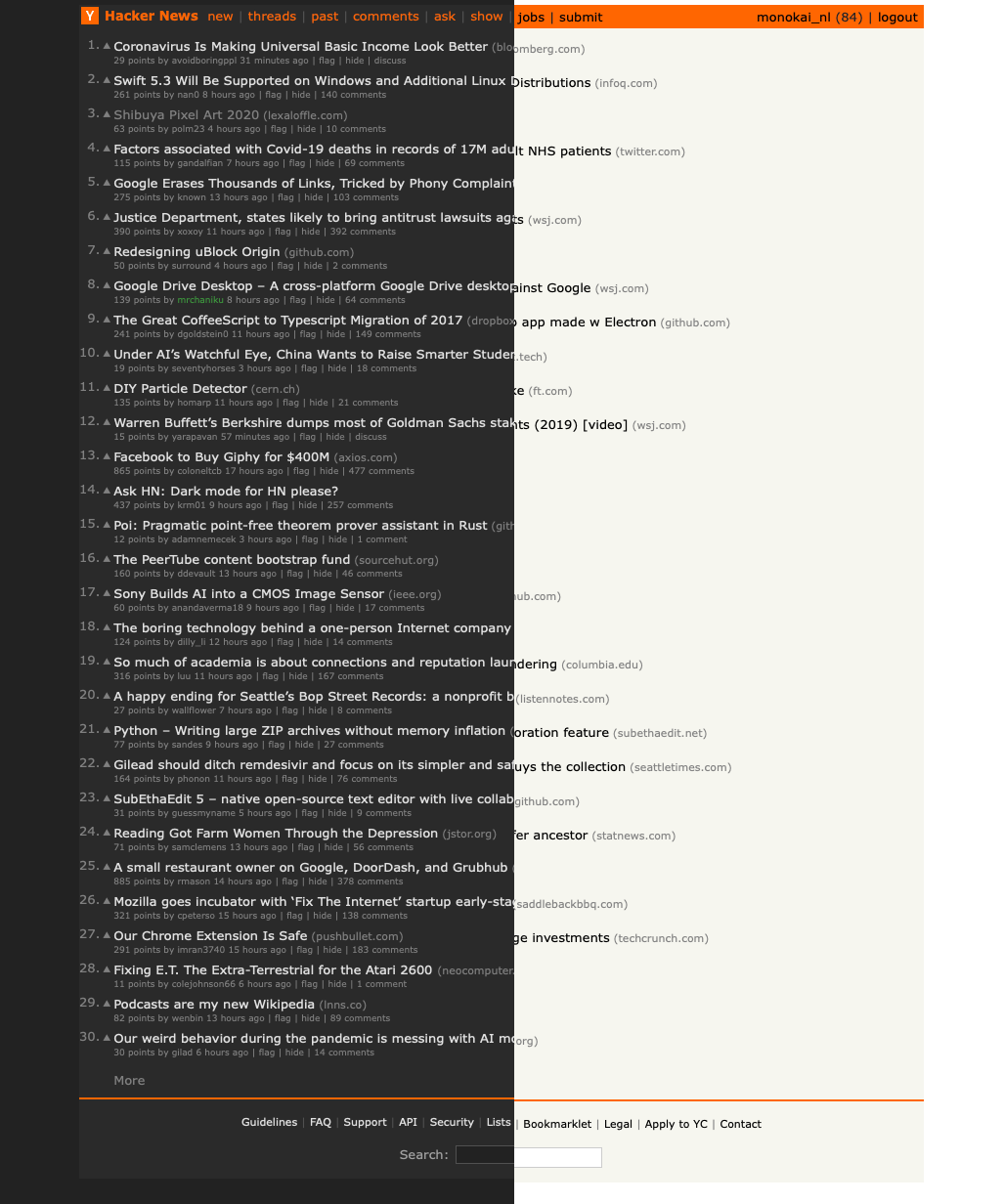
We can add CSS to https://news.ycombinator.com/news.css for prefers-color-scheme: dark, but that leaves open the question of specifically what CSS to put in there. Anyone who wants to make a suggestion is welcome to. Post it in this thread so others can comment, or email it to hn@ycombinator.com. I've roped Zain, YC's designer, into helping with this, and we'll come up with something.
p.s. If you're inclined to post "this is 2020, how come HN doesn't $thing", remember our motto: move slowly and preserve things: https://hn.algolia.com/?dateRange=all&page=0&prefix=true&que.... When I say slowly I mean slowly. This is also called alligator energy. https://news.ycombinator.com/item?id=16442716
https://monokai.nl/lab/hacker-news/hn-dark1.png
https://monokai.nl/lab/hacker-news/hn-dark2.png
https://monokai.nl/lab/hacker-news/hn-dark3.png
The principles I followed:
- Alligator energy. No need to redo the layout or apply the latest design trends. HN is fine as is.
- Respect the original design. The dark version uses the same color hierarchy as the elements in the original design.
- No-nonsense. All colors are pure grayscale.
- Simple. Only minimally adjusted the CSS ( https://monokai.nl/lab/hacker-news/news.css ). This can be easily implemented in the current CSS using some media queries. I only added one thing in the HTML which is a span around the karma points at the top.
- Keep the orange. This was a puzzle. I think the original bar is too jarring on a dark background. But, HN is not HN without a touch of orange. I decided to style the top links only. This keeps the soul of HN.
- Readability. You should be comfortable reading this dark mode in low light. Too much contrast doesn't read nicely, but the original HN text has a lot of contrast with its #000 on an off-white background. My dark background is off-black and the text is turned down a notch from pure white. If you need less contrast, you can turn down the brightness of your display.
- The upvote triangles are unicode now inserted via CSS. Saves a request and doesn't render pixelated on Retina.
- Best thing. All comments are placed on a big slab of #2a2a2a. That's triple the answer to you know what.
A less controversial solution would be to simply hook into the user's system-level light/dark setting: https://developer.mozilla.org/en-US/docs/Web/CSS/@media/pref...
That said, I've wanted this feature desperately for a long time. Browsing HN on my desktop monitor in the evening is blinding and gives me a headache. I find myself resizing the window to be phone-sized just so my eyes are assaulted with less light.
If you need a hand with the CSS, I'd be happy to write it myself (speaking of which; is HN open-source?)
It is the effect of having a line which is longer than the viewport - so we end up having to scroll that specific line. Some might say it is better not to wrap code but I more often see this as part of a quote. I you really do not like to wrap the lines then I would prefer a scrollbar on the whole section. (I hope this line demos the issues).
My CSS knowledge is severely limited but I was thinking something along the lines of
    pre {
            overflow-x: auto;
            white-space: pre-wrap;
            white-space: -moz-pre-wrap;
            white-space: -pre-wrap;
            white-space: -o-pre-wrap;
            word-wrap: break-word;
     }
I salute the credo of moving slowly. And I hate to be a cry baby. I even hate the feature creep. But here I am :-}
For myself, most of the time my monitors are set to a maximum of around 30 on a scale of 100, and I don't get any eyestrain. Dark mode with a properly calibrated monitor, in contrast, does give me eye strain - the light letters on the dark background don't play well with my Keratoconus.
Right now, with HN defaults, at around 7pm, the brightness is 15, and contrast is 30.
Yet, I know of the popularity of dark themes. But I wonder if I'm the only one or whether there are more people that experience the same effect?
I think it gets worse when I have to switch between mostly-dark content to mostly-light content. Thus, since most pages on the web have (near-) white background, I imagine I would really suffer when switching to and from HN a lot if it were in dark mode.
But hey, maybe that would be a good thing for my productivity ;-)
It'd be fine to offer that as an option, but I'm not really seeing any reason at all why that should be default and I recall a few posts here where quite a few other's expressed they were not fans of dark mode themes.
To be fair, I never browse this or most any other web site on a phone, so, maybe apply that to phones only if that's an option.
    ycombinator.com##html:style(background-color: #3e3e42 !important)
    ycombinator.com###hnmain:style(background-color: #2E2E31 !important)
    ycombinator.com##.age:style(color: #ccc !important)
    ycombinator.com##.c00:style(color: #ccc !important)
    ycombinator.com##.comhead > a:style(color: #dedede !important)
    ycombinator.com##.comhead:style(color: #dedede !important)
    ycombinator.com##.hnuser:style(color: #ccc !important)
    ycombinator.com##.subtext > a:link:style(color: #ccc !important)
    ycombinator.com##.subtext > a:style(color: #ccc !important)
    ycombinator.com##.subtext:style(color: #ccc !important)
    ycombinator.com##.title > a:style(color: #dedede !important)
ycombinator.com##a:link:style(color: #ccc !important)I've looked at HN and many other sites on my phone at night for a very long time, and never once do my eyes burn. Why is this the expectation? Use Flux or a similar light dimmer on your phone/laptop, problem solved.
And you can easily click to install with a browser extension like https://add0n.com/stylus.html
const getAttributes = () => {
  let head = document.head || document.getElementsByTagName("head")[0];

  return {
    head,
};const changeStyles = (targetElement) => {
style = document.createElement("style");
  // set style.innerHTML to darker colors, append to head
  style.type = "text/css";
  style.innerHTML = `
    body, #hnmain { background: #272822; }
    a.storylink, a.morelink, span.commtext { color: #fff; }
    a.storylink:visited { color: #444444; }
  `;
targetElement.appendChild(style);(function main() { const { ...attributes } = getAttributes(); changeStyles(attributes.head); })();
I also have noticed that I never use the site specific Dark mode implementations as it is a lot more convenient to globally enable dark mode (at night) rather than playing around with toggles for every website that supports it.
  :root,
  html {
     background-color: white;
     filter: invert(100%);
  }

  * {
     background-color: inherit;
  }
1. Go to chrome://flags
2. Enable "Force Dark Mode for Web Contents"
This works pretty well on all sites, not just hacker news...
It would take me weeks to redo my website to support dark mode. Better to wait and let browser technology catch up.
But the management is very tolerant of and even warmly welcomes the fact that the membership includes a lot of programmers and we tend to get a lot of third party solutions.
Off the top of my head, I don't know of an HN reader thingy in dark mode, but asking if those exist is much more likely to get you an immediately available solution than asking management to alter the appearance of HN in some specific way.
https://gist.github.com/kirkegaard/0d7e96bf0ebbce5ddad98e59f...
This is what it looks like: https://imgur.com/a/KsLnoC4
https://chrome.google.com/webstore/detail/deluminate/iebboop...
I tried most of the "dark mode" chrome extensions out there and found this was the best (compatibility, performance, etc.). Not affiliated, just a happy user.
I regularly zoom to 150% on HN or use a bookmark that sets styles via JS so I don't have to strain while reading. Am I the only one? And no, I don't need glasses!
[0] https://darkreader.org/ | https://github.com/darkreader/darkreader
[1] https://play.google.com/store/apps/details?id=io.github.hidr... | https://github.com/hidroh/materialistic
Light themes are certainly less cool but since you can have greater contrast they have much better readability and less strain on your eyes.
Don't know how I can screenshot that, but it basically makes these changes: 1. Title bar remains orange (Strangely, it's not inverted) 2. Text colors which are black become white 3. The background white gets converted to black 4. Everything grey(upvote, points etc.) remains grey.
We can try that out on the website using CSS filter no? Something like
filter: invert(1); // Set based on user opt-in value
https://developer.mozilla.org/en-US/docs/Web/CSS/filter-func...
:root { color-scheme: light dark; }
This allows the browser to change the default rendering of controls like inputs and textareas. It also sets up many defaults nicely. Please use this in conjunction with @media (prefers-color-scheme: dark).
Reference: https://webkit.org/blog/8840/dark-mode-support-in-webkit/ https://drafts.csswg.org/css-color-adjust-1/#color-scheme-pr...
https://userstyles.org/styles/22794/a-dark-hacker-news
Here's what my HN looks like - https://imgur.com/a/UM5qXtD
td { background-color: inherit; }
.c00 { color: #D2D2D2 !important; }
a { color: #4C709B !important; }
textarea { color: #D2D2D2 !important; background-color: #181818; }
input { color: #D2D2D2 !important; background-color: #181818; }
table { background-color: #1C1C1C; }
For those who don't mind using a bookmarklet or using something like TamperMonkey, this bit of js does a pretty good job darkening most sites:
!function(d){d.head.appendChild(d.createElement('style')).innerText='html,img,video{-webkit-filter:invert(1)hue-rotate(180deg);filter:invert(.9)hue-rotate(180deg)}body{background:#000}'}(document);
Screenshot: https://imgur.com/a/TrQZwoK
It can be fully customized to whatever theme/color you prefer. I find it especially pleasant to use on my tablet - it lives on my home screen as a shortcut.
Preview: https://i.imgur.com/nbkPFyL.png
Source + Live Preview: https://stackblitz.com/edit/js-bgp3k5?file=style.css
Edit: updated stackblitz link, previous link was incorrect.
For news.ycombinator.com - https://pastebin.com/K1KS64KR
For hn.algolia.com (the search form) - https://pastebin.com/ksH6QcV4
However, if we want to keep HN clean, but help users with closed mobile browsers, how about we add an option to add own css url in HN profile?
This way I could even create my own dark theme and have it available on all of my devices.
And then, over time, a really nice battle tested night theme can emerge from this experimentation.
If you’re on iOS, get the MiniHack app. I’ve been using it for I-don’t-know-how-many-years and it has a dark mode. It allows me to sign on and comment, thread collapsing etc, so it’s absolutely equivalent to browsers. It’s my daily driver as far as HN is concerned.
(This comment was posted with minihack in dark mode, btw.)
https://userstyles.org/styles/160459/hacker-news-readable-da...
Also, CSS is an abomination, aesthetics have always belonged on the client side.
  html {
    filter: invert(0.95);
    background: rgba(9, 9, 16, .95);
  }
https://chrome.google.com/webstore/detail/hn-enhance/dmnbgmc...
Search for "dark-mode" in chrome://flags.
Some browser have it integrated in regular settings already.
At least HN is simple and consistent enough that your userstyles won't break.
It works great
Yes, the battery savings may be dismal but the comfort is really unparalleled.
Thanks!
Works pretty well.
I use Materialistic on Android and its dark mode is great
Also, how would you see the black bar when someone dies?
Screenshots: https://imgur.com/a/RhesGUo
        /*Base*/
        ::selection{background: #111; color: #F60;}
        body{background-color: #222; color: #CCC;}
        a:link{color: #8AD !important;}
        a:visited{color: #666 !important;}
        a.storylink{color: #dfdfdf !important;}

        /*Font*/
        :root{font-size: 16px; text-rendering: optimizeLegibility;}
        body, td, .admin, td, .subtext, td, input[type="submit"], .default, .admin, .title, .subtext, .yclinks, .pagetop, .comhead, .comment{font-family: sans-serif;}
        body,td,input,textarea,.default,.title,.pagetop{font-size: 1rem;}
        .comment{font-size: 0.9167rem;}
        .admin, .admin td{font-size: 0.875rem;}
        .yclinks, .comhead{font-size: 0.8333rem;}
        .subtext,.subtext td, .rank, font[size="1"]{font-size: 0.75rem;}
        .rank{font-weight: bold;}

        /*Input*/
        input, textarea{background-color: #333; border: 0.0625rem solid #555; padding: 0.1875rem;}
        input[type="submit"]{background-color: #444; padding: 0.5rem 1.5rem;}

        /*Vote Arrows*/
        .votearrow{display: none;}
        a[id^="up"]:before{content: "▲"; color: #666; font-weight: bold; padding: 0.1875rem;}
        a[id^="up"].nosee:before{visibility: visible; color: #F60;}
        a[id^="down"]:before{content: "▼"; color: #666; font-weight: bold; padding: 0.1875rem;}
        a[id^="down"].nosee:before{visibility: visible; color: #369;}

        /*Spacers*/
        tr.spacer{height: 0.1875rem !important;}
        #pagespace{display: none;}

        /*Backing*/
        #hnmain{background-color: #111;}
        .itemlist{background-color: #111; width: 100%; padding: 0.1875rem;}

        /*Header Bar*/
        #hnmain > tbody > tr > td[bgcolor="#ff6600"]{position: relative; background-color: #333; border: 0.1875rem solid #111; border-bottom: none; padding: 0.1875rem;}
        #hnmain > tbody > tr > td[bgcolor="#ff6600"] a{color: #F60 !important;}
        .pagetop{color: #888;}
        #hnmain > tbody > tr > td[bgcolor="#ff6600"] td:nth-child(2){position: absolute; top: 0.375rem; width: 100%; height: 0 !important; text-align: center; margin-left: -30px; padding-left: 30px;}
        .hnname{position: absolute; left: 30; top: 0.1875rem;}

        /*Syncopation*/
        .itemlist .athing:nth-child(odd), .itemlist .athing:nth-child(odd)+tr, .athing.comtr:nth-child(odd){background-color: #1E1E1E;}
        .itemlist .athing:nth-child(even), .itemlist .athing:nth-child(even)+tr, .athing.comtr:nth-child(even){background-color: #242424;}

        /*Item*/
        .itemlist .athing td{padding-top: 0.5rem;}
        .itemlist .athing+tr td{padding-bottom: 0.5rem;}
        .itemlist .athing .title:first-child{background-color: #111; border-bottom-right-radius: 0.375rem !important; text-align: center; padding-top: 0.375rem;}

        /*Fat Item*/
        .fatitem{padding-top: 0.625rem;}
        .fatitem form{margin: 0;}
        .fatitem .votelinks{padding: 0 0.375rem;}

        /*Coments*/
        .comment-tree{width: 100%;}
        .ind{background-image: repeating-linear-gradient(to right, #111, #111 39px, #222 40px);}
        .athing.comtr td{padding: 0;}
        .athing.comtr table{border-collapse: collapse;}
        .athing.comtr .default{padding: 0.625rem 2.5rem 0.625rem 0;}
        .athing.comtr .votelinks{padding: 0.625rem;}
        .athing.comtr .comment a{color: #369 !important;}
        .athing.comtr .comment .reply a{color: #8AD !important;}
        .comment{max-width: none;}
        .comment pre{max-width: 70vw;}
        .comment pre *{font-family: monospace;}

        /*Custom*/
        .subtext .hnuser:link,
        .comhead a:link,
        .subtext a:visited {
          color: #c678ddcc !important;
        }
        .age a:link,
        .age a:visited {
        color: #98be65cc !important;
        }

        /*Comment Colors*/
        .c00{color: #dddddd;}
        .c5a{color: #cecece;}
        .c73{color: #bebebe;}
        .c82{color: #aeaeae;}
        .c88{color: #9c9c9c;}
        .c9c{color: #888888;}
        .cae{color: #828282;}
        .cbe{color: #737373;}
        .cce{color: #5a5a5a;}
        .cdd{color: #000000;}

        /*New Comments Page*/
        .athing > .default{padding: 0.625rem 2.5rem 0.625rem 0 !important;}
        .athing > .ind+.votelinks{padding: 0.625rem;}

        /*Hover*/
        .itemlist .athing:hover, .itemlist .athing:hover td, .itemlist .athing:hover+tr td{background-color: #333;}
        .itemlist .athing:hover .rank{color: #369;}
        .athing.comtr:hover{background-color: #333;}

        body > center > table {
            width: 80% !important;
}Because the site is so simple, it already works really well on mobile. But these tiny little buttons ruin the experience for me, and I'm sure others.
Just edit it bro...
Any science behind that claim?