Ctrl+X is Cut. I had to learn this from a friend after I accidentally hit Ctrl+X & thought I lost what I was typing, they told me to hit Ctrl+V
Ctrl+Z undo. Redo is often Ctrl+Y or Ctrl+Shift+Z, or Ctrl+Z in Notepad where you don't have an undo queue
Ctrl+L focuses the location bar in browsers
Ctrl+Shift+N is private browsing in Chrome, but Ctrl+Shift+P in Firefox
Alt-Tab allows cycling windows (especially important when working with only 1 monitor)
Windows+LeftArrow / Windows+RightArrow can be used to split windows on the desktop
Shift clicking in Diablo 2 can be used to quickly move pots into belt. While 1/2/3/4 drink, Shift 1/2/3/4 can be used to heal your mercenary. Shift clicking in shop will buy enough to fill belt. http://classic.battle.net/diablo2exp/items/potions.shtml
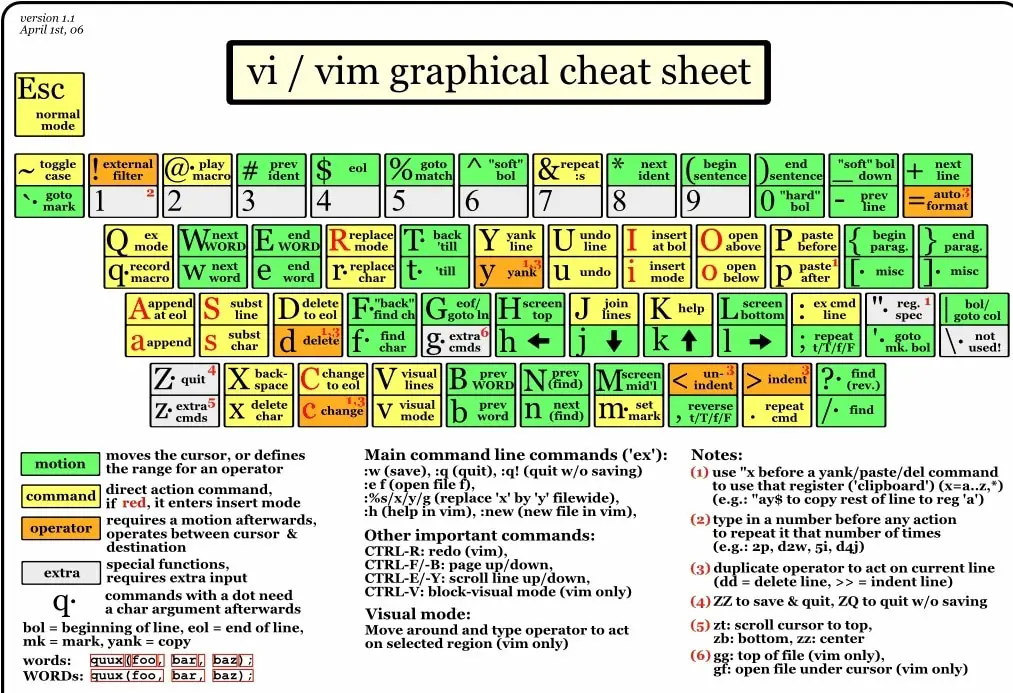
A coworker was doing a repetitive SQL script modification, so he printed out https://helloacm.com/wp-content/uploads/2015/09/vi-vim-cheat... after I suggested vim would pay for itself in this instance (I'm pretty sure it did, I personally found a lot of help using vim macros to implement data imports from pdf scans)
Keyboard shortcuts you may want if you end up in bash: https://www.howtogeek.com/howto/ubuntu/keyboard-shortcuts-fo...